
OBJECTIVE
To create an Album to better organize and share Photos & Videos.
BACKGROUND
ConstructionOnline understands that photo documentation is essential to project management. It is of utmost importance that a project has proper documentation, as photos and videos provide critical evidence that could prevent potential litigation. Organizing Photos & Videos into Albums is a valuable way to stay organized and share information easily with your Project Team, ClientLinks and TeamLinks.
THINGS TO CONSIDER
- Albums can be shared within ConstructionOnline, via email, to Cloud Storage and on your Public Profile.
- Albums can be shared with ClientLink, TeamLink, Company, and Basic users or made Private.
- Private Albums/Folders cannot be shared with ClientLink/TeamLink users.
- Only the Album/Folder creator will be able to view a Private Album/Folder. Administrators will not be able to see Private Albums/Folders created by Employees.
- Albums can be moved to other projects and folders.
STEPS TO CREATE AN ALBUM
A. From Photos:
- Navigate to the desired Project via the Left Sidebar
- Choose the Photos tab

- Select the Project Albums category

- Click the green +Add New Album button

- A new highlighted Album will be added

- Enter the Album Name
B. From Files:
- Navigate to Company Files, My Files, or a Project via the Left Sidebar
- Select the Files tab if you're in a Project
- Click the green +Add New button
- Select New Album from the dropdown menu
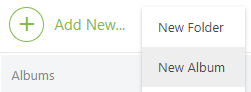
- A new highlighted Album will be added
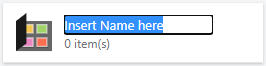
- Enter the Album Name
HAVE MORE QUESTIONS?
- Frequently asked questions (FAQ) about Files & Photos can be found in the article FAQ: Files & Photos.
- If you need additional assistance, chat with a Specialist by clicking the orange Chat icon located in the bottom left corner or visit the UDA support page for additional options.