
OBJECTIVE
To Create a Project Summary Report in ConstructionOnline
BACKGROUND
With the Project Summary Report, you are able to document and track all aspects of a project in a single, easy-to-create report.
THINGS TO CONSIDER
- The Project Summary Report can include: Project Image, Scope of Work, Project Team, Estimate Summary, Change Orders, and Schedule Summary.
- Project Summary Reports include Company Branding and are generated as print-ready PDF documents.
STEPS TO CREATE A PROJECT SUMMARY REPORT
- Navigate to the desired Project via the Left Sidebar
- Click the Project Name in the top-center of the page
- Hover over Print
- Select Project Team
- This will open the Project Summary window
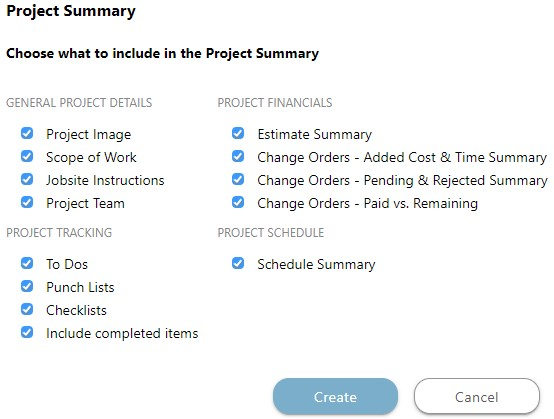
- Choose what to include in the Summary & click Create
- The Report will open in a new tab
- You can Share, Save, Download, Edit, or Print the Report from this tab

HAVE MORE QUESTIONS?
- Frequently asked questions (FAQ) about Projects can be found in the article FAQ: Projects.
- If you need additional assistance, chat with a Specialist by clicking the orange Chat icon located in the bottom left corner or visit the UDA Support Page for additional options.