
OBJECTIVE
To create a Custom Calendar in ConstructionOnline.
BACKGROUND
Custom Calendars are calendars that are not associated with a project. They are often used to easily organize birthdays, holidays, personal calendars, and other groups of tasks that are not limited to a single project.
HOW TO CREATE A CUSTOM CALENDAR
- Navigate to the Company Calendar via the Left Sidebar
- Click Show/Hide Calendars under the Calendar/Schedule Categories
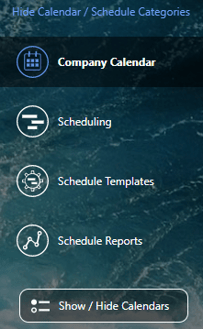
- Select the plus (+) sign next to Custom Calendar
- This will open the Create Custom Calendar modal

- This will open the Create Custom Calendar modal
- Name your calendar and select additional options such as:
- Assigned Resources: Contacts that will be able to view and edit any events on this calendar
- Related Resources: Contacts that will be able to view any events on this calendar
- Calendar Color: The color that calendar events will display as on your ConstructionOnline calendar
- Integration Options: Choose whether events associated with this calendar will automatically sync with your Google or Outlook calendars
- Select Save
HAVE MORE QUESTIONS?
- Frequently asked questions (FAQ) about Calendars can be found in the article FAQ: Calendars.
- If you need additional assistance, chat with a Specialist by clicking the orange Chat icon located in the bottom left corner or visit the UDA support page for additional options.