
OBJECTIVE
To convert a Schedule Group to a Task in ConstructionOnline
BACKGROUND
ConstructionOnline offers the world's fastest online Scheduling, providing your team with a powerful suite of tools to accurately and efficiently plan your Project's timeline, as well as maintain that accuracy throughout the duration of the Project. Scheduling is a live feature and updates as changes are made, ensuring your project team is seeing the most up to date information.
STEPS TO CONVERT A SCHEDULE GROUP TO A TASK
- Navigate to the desired Project via the Left Sidebar
- Select the Calendars & Schedules tab
- Choose the Scheduling category
- Highlight the Group you wish to convert to a Task
- Click the Toolbar icon at the top right of the Schedule Gantt Progress pane

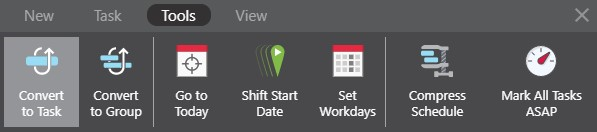
- In the Tools tab, select Convert to Task
HAVE MORE QUESTIONS?
- Frequently asked questions (FAQ) regarding OnPlan Scheduling can be found in the FAQ: Scheduling article.
- If you need additional assistance, chat with a Specialist by clicking the orange Chat icon located in the bottom left corner or visit the UDA support page for additional options.