
OBJECTIVE
To attach files to an existing Submittal in ConstructionOnline
BACKGROUND
Submittals are a great tool to use for documentation of approval for specifications, shop drawings, product information, and/or materials samples. Attach any Files/Photos pertinent to the Submittal for additional clarification.
THINGS TO CONSIDER
- Only Company Employees can create Submittals.
- Submittals must be associated with an existing Project.
- Submittals can be shared with TeamLink & ClientLink members to view and respond to.
STEPS TO ATTACH FILES TO A SUBMITTAL
- Navigate to the desired Project via the Left Sidebar
- Select the Communication tab
- Choose the Submittals category
- Right-click on the desired Submittal
- Select Edit Submittal
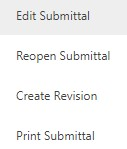
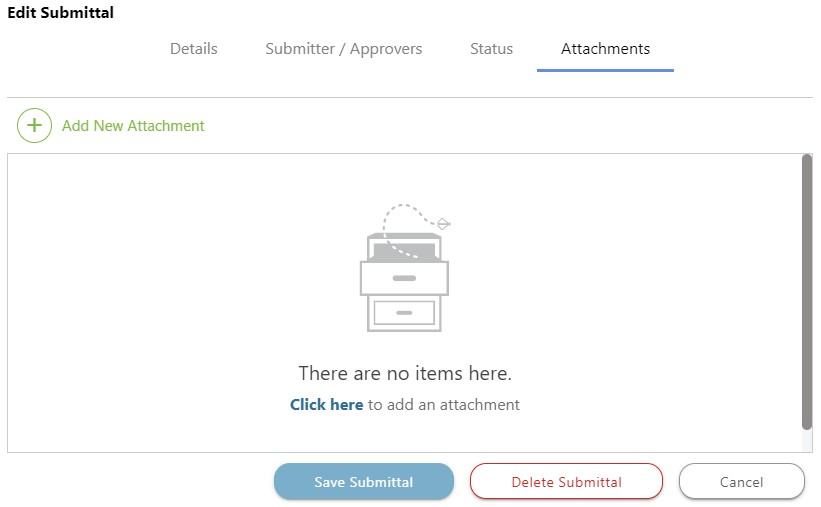
- This will open the Edit Submittal window
- Choose the Attachments tab
- Click the green +Add New Attachment button
- This will open the Upload Files window
- Choose where to upload your file from or drag & drop it in the window
- Click Save Submittal
If the Submittal is pending response, you can click the Attach photo(s) or file(s) button at the bottom left of the Submittal response.
HAVE MORE QUESTIONS?
- Frequently asked questions (FAQ) regarding Submittals can be found in the FAQ: Submittals article.
- If you need additional assistance, chat with a Specialist by clicking the orange Chat icon located in the bottom left corner or visit the UDA support page for additional options.