
OBJECTIVE
To preview a File or Photo in ConstructionOnline™
BACKGROUND
ConstructionOnline™ makes it easy for you to edit text documents with our fully-featured text editor - right inside ConstructionOnline. Project photos can also be marked up, cropped, rotated and more with our built-in photo editor. Previewing allows you to glance at Files & Photos to easily verify their accuracy before sharing them with others.
THINGS TO CONSIDER
- When previewing photos you can also view the photo information, share, download, rotate, edit, duplicate or move the image using the menu bar in the top right hand corner

- Users can edit files and photos following the steps in these articles:
- Administrators and Company Users with permissions to view files and photos are able to access details and comments.
- Files can be viewed while offline to be accessible in the field.
- You can only view file and photo comments from the ConstructionOnline Mobile App.
- ClientLink/TeamLink users are only able to see the details and comments of files/photos that are shared with them through the portal.
STEPS TO PREVIEW A FILE OR PHOTO
- Navigate to Company Files, My Files, or a Project via the Left Sidebar
- Select the Files tab if you're in a Project
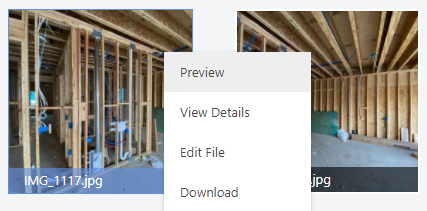
- Right-click on the File/Photo
- Select Preview from the dropdown menu
HAVE MORE QUESTIONS?
- Frequently asked questions (FAQ) about Files & Photos can be found in the article FAQ: Files & Photos.
- If you need additional assistance, chat with a Specialist by clicking the orange Chat icon located in the bottom left corner or visit the UDA support page for additional options.