
BACKGROUND
Construction companies frequently manage projects with recurring permit requirements. Manually entering these similar or recurring permits is time-consuming and prone to errors, hindering efficiency and increasing project risk. ConstructionOnline addresses this challenge by enabling users to duplicate existing permits with just a few clicks. This functionality significantly streamlines the permit process, reduces data entry, and ensures consistency while boosting productivity and minimizing potential delays.
⚠️ Important: Archived permits cannot be duplicated.
HOW TO DUPLICATE A PERMIT
- Access the "Company Overview" tab through the Left Sidebar or the Company Selector in the Top Navigation Bar.
- Under the "Company" section, select "Permit Tracking."
- This will open your "Project Permits" List.
- Locate the desired permit you wish to duplicate.
- Right-click on the permit and select the "Duplicate" option.
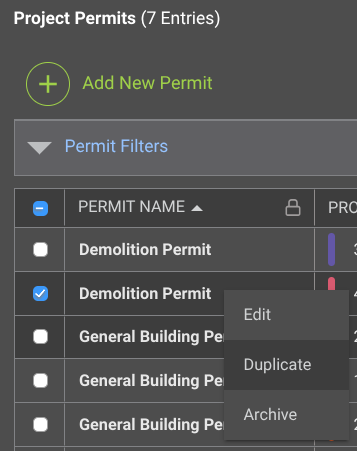
- This will create a copy of the permit that will appear within the "Project Permits" List.
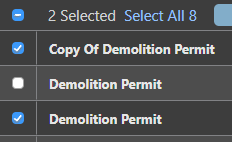
- This will create a copy of the permit that will appear within the "Project Permits" List.
➡️ Pro Tip: Duplicate multiple permits by selecting their checkboxes, right-clicking any of the selected permits, and choosing the "Duplicate" option.
ADDITIONAL INFORMATION
- Subscription Level: ConstructionOnline's OnGuard Permit Tracking feature is available for companies with current ConstructionOnline subscriptions at Team, Business, and Enterprise levels.
- Permit Tracking is also available as a Per-Company Add-On for all other plans.
- Permissions: Admin Users and Company Users with "Can Create, Edit, & Delete" permissions for Permits can duplicate existing permits.
- CO™ Mobile App: Users with the appropriate permissions can duplicate permits via the ConstructionOnline Mobile App.
HAVE MORE QUESTIONS?
- If you need additional assistance, chat with a ConstructionOnline Specialist by clicking the orange Chat icon in the bottom left corner or visit the UDA Support Page for more options.