
OBJECTIVE
To activate a communication thread with one or more contacts that was previously archived
THINGS TO CONSIDER
- Archived Conversations cannot be viewed by anyone outside of Company Users
- Archived Conversations cannot be responded to
- Messages can be associated with a Project, but do not have to be
- Files/Images can be attached to Messages
STEPS TO ACTIVATE AN ARCHIVED MESSAGE
- Navigate to the desired Project via the Left Sidebar
- Select the Communication tab
- Choose the Messages category
- Click the Archived tab in the top right corner of the Project Messages pane

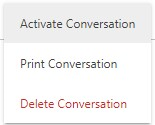
- Right-click on the desired Message
- Select Activate Conversation
HAVE MORE QUESTIONS?
- Frequently asked questions (FAQ) about Messages can be found in the article FAQ: Messages.
- If you need additional assistance, chat with a Specialist by clicking the orange Chat icon located in the bottom left corner or visit the UDA support page for additional options.